An AI image may need realistic lighting, readable text, consistent characters, or a clear information layout. MiniMax H3 Image brings these tasks into one generation and editing model.
We tested its photographic quality, visual styles, design capabilities, and reference control. This review covers the model’s specifications, our findings, and creative ways to apply them.
TL;DR
Detailed output: native 4K generation supports fine textures and flexible cropping.
Creative range: our tests span photography, stylized imagery, game visuals, and photorealistic surrealism.
Design control: posters and information graphics show how the model handles hierarchy and complex relationships.
Reference accuracy: clear assignments help keep characters, outfits, props, and environments aligned.
Two API versions: Standard costs less; Highspeed prioritizes faster generation at higher rates.
What Is MiniMax H3 Image?
MiniMax H3 Image is MiniMax’s image generation and editing model in the H3 family. It was released on November 10, 2026.
It supports text-to-image creation and editing with reference images.
The MiniMax H3 Image API offers two versions:
Standard: the regular version, with lower API costs.
Highspeed: the faster version, with higher API costs.
Both support text-to-image and image editing, with the same API parameters and limits.
Parameter | Specification |
Supported tasks | Text-to-image; reference-based image editing |
Diffusion transformer | 33.1 billion parameters |
Sampling | 6 steps in the released checkpoint |
Native output | Approximately 16 megapixels |
Square 4K size | 4096 × 4096 |
Landscape 4K example | 5472 × 3072 at 16:9 |
Maximum output area, API | 20,000,000 pixels |
Aspect-ratio range, API | 1:3 to 3:1 |
Reference images per edit, API | 1–16 |
Images per request, API | 1–10 |
Prompt length, API | Up to 32,000 characters |
Output formats, API | JPEG, PNG, WebP |
Weight release | Open weights under a Community License |
Architecture and sampling describe the released checkpoint. API limits describe the service interface. With prompt enhancement disabled, only about the first 4,096 tokens take effect.
4K dimensions vary by aspect ratio. H3 Image produces still images; H3 video workflows can use suitable images as frames or references.
4K Detail, Photorealism, and Action Photography
Capture the detail and character of a photograph.
Native 4K Detail
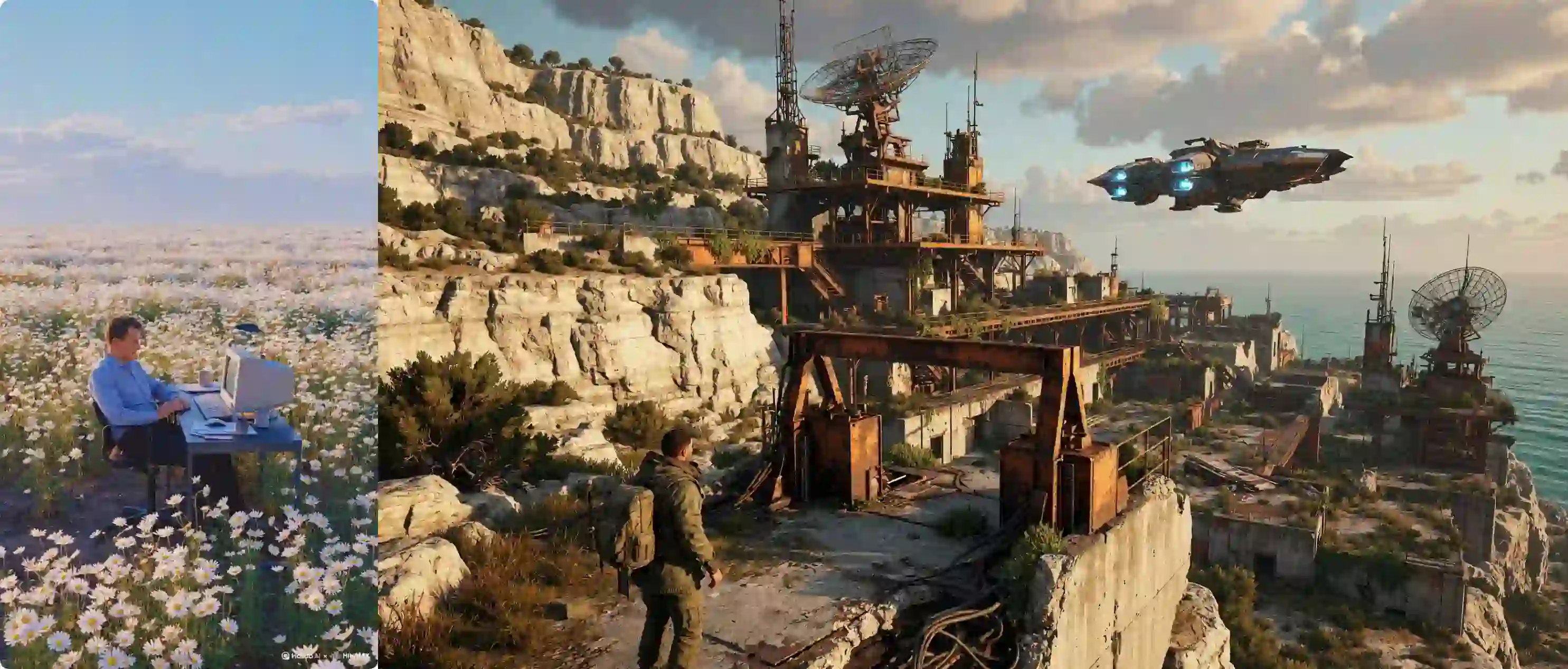
We used native 4K generation to examine fine texture, contours, and lighting transitions.
The detail example highlights three useful qualities:
Texture: small surface variations remain visible.
Edges: fine contours help define the subject.
Lighting: local detail follows the scene’s overall illumination.
Creative tip:
Identify which details matter most.
Give the main subject room in the composition, and leave space for cropping or added text.
Note: Images above are web-optimized preview; the original was generated at native 4K.
Realistic Textures and Camera Character
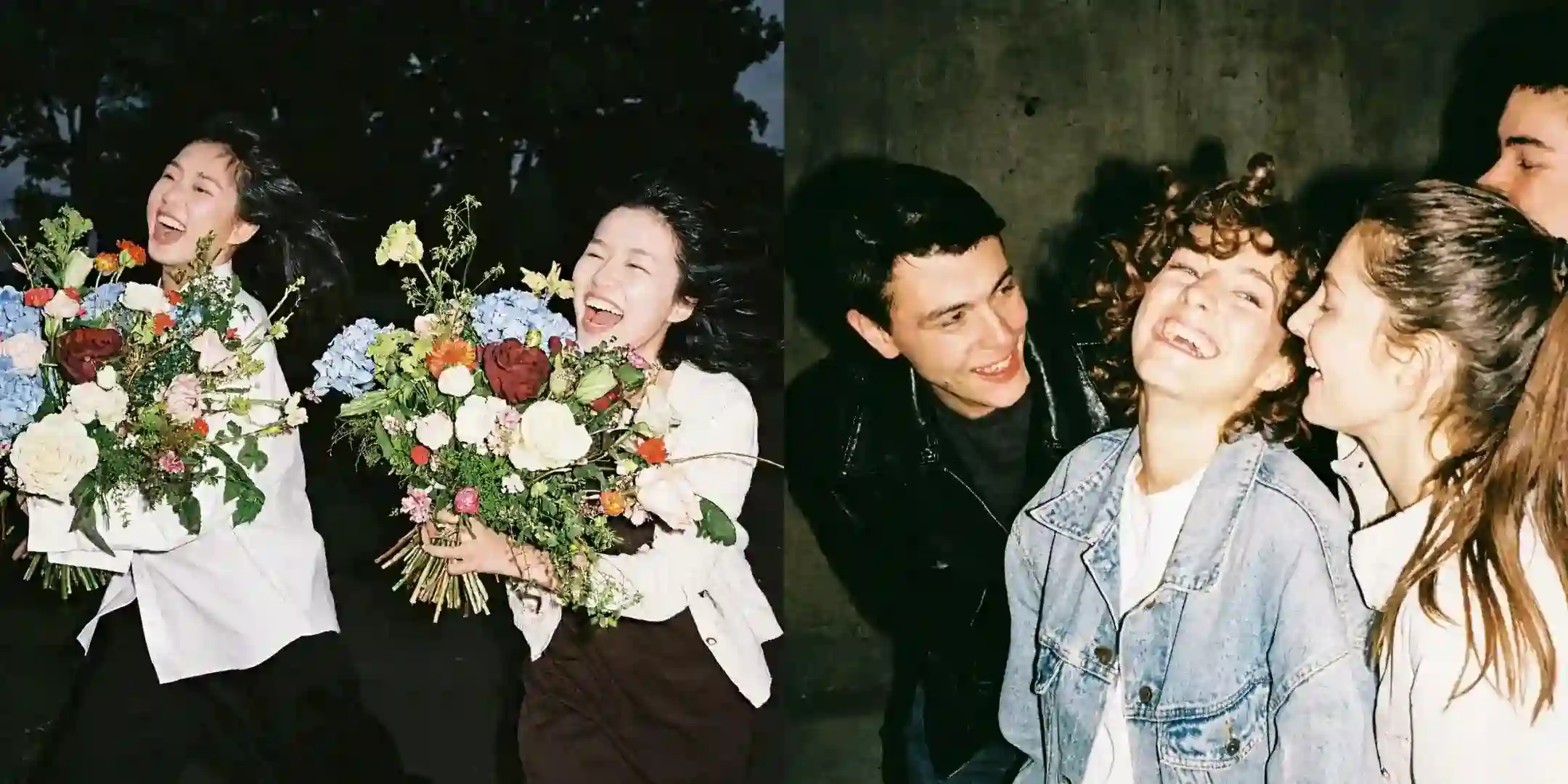
We tested direct-flash, film-inspired lifestyle portraits. The brief emphasized natural expressions, lighting, and the subjects’ surroundings.
What stood out:
Bright subjects separate clearly from darker backgrounds.
Hair, clothing, and flowers add material detail.
Relaxed expressions and loose framing create a candid feel.
Our finding:
Photographic character helps make the detail believable. Light, framing, and surface texture need to work together.
For your own portraits, define the light source, camera treatment, and moment.
Apply the same approach to editorial photography, lifestyle campaigns, and creator-profile visuals.
Sports and Action Photography
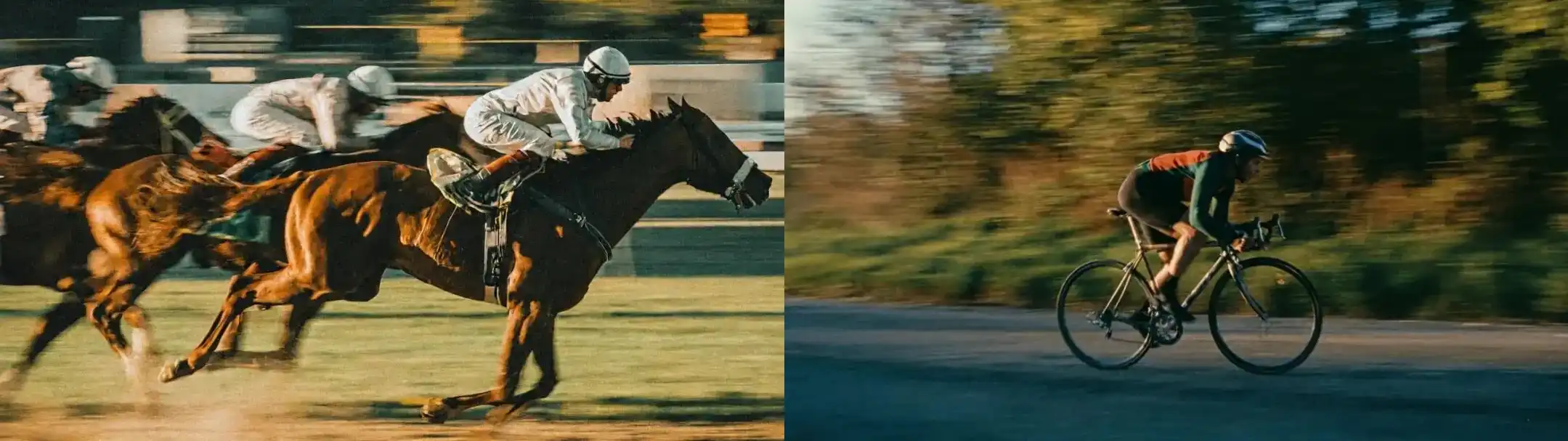
Our racing and cycling tests used panning and slow-shutter effects.
We carried a shared treatment between subjects: horizontal blur, deep green shadows, warm light, and a film-like finish.
We found two strong visual cues:
Readable subjects keep attention on the action.
Background streaks establish direction and speed.
Creative takeaway:
Keep the photographic method consistent when changing subjects.
Shared light, color, and motion treatment can connect a campaign series.
Choose the motion effect deliberately:
Panning: a defined subject against a streaked background.
Frozen action: a sharply captured instant.
Expressive blur: movement influences the subject’s outline.
Stylized Image Generation
Explore different visual languages with a clear direction.
A Range of Visual Styles
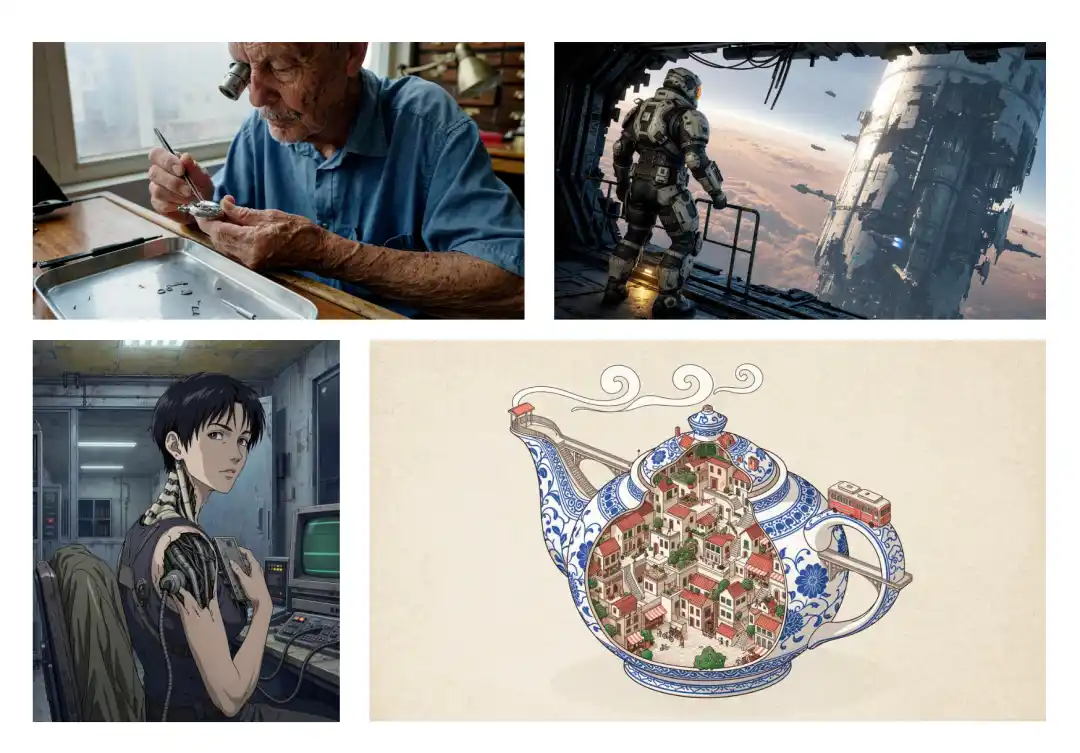
Our style overview tested several visual treatments. The differences involved form, linework, materials, lighting, and palette.
We found that a convincing style depends on connected choices:
Form: proportions, silhouettes, and shape language.
Surface: photographic texture, drawn marks, or rendered materials.
Atmosphere: light, contrast, and color.
Keep these choices consistent across a series. When using a reference, specify which visual qualities should carry into the new image.
GTA5-Style Game Imagery
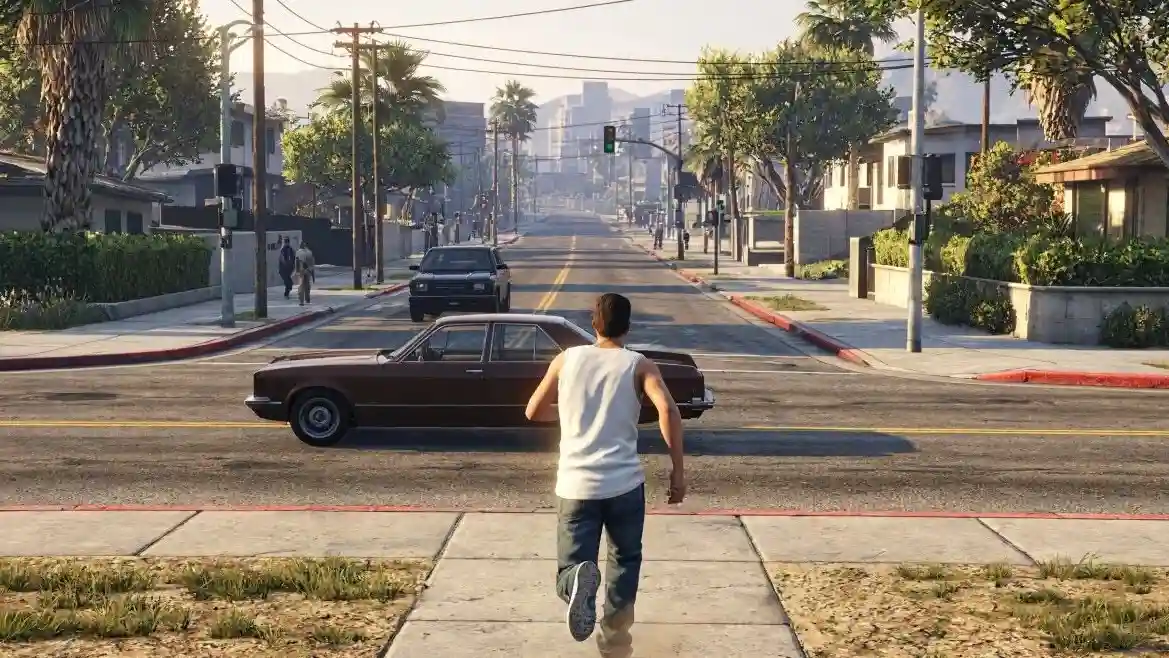
We tested GTA5-style imagery around an in-game viewpoint.
The game-like result came from the combination of:
Third-person framing and character scale.
Street layout and environmental density.
Daylight and game-rendered surfaces.
Creative tip:
Combine the style name with these visible features.
This gives clearer direction for game-inspired scenes and visual pitches.
Poster Design and Information Visualization
Turn ideas and information into clear visual design.
Poster Composition and Typography
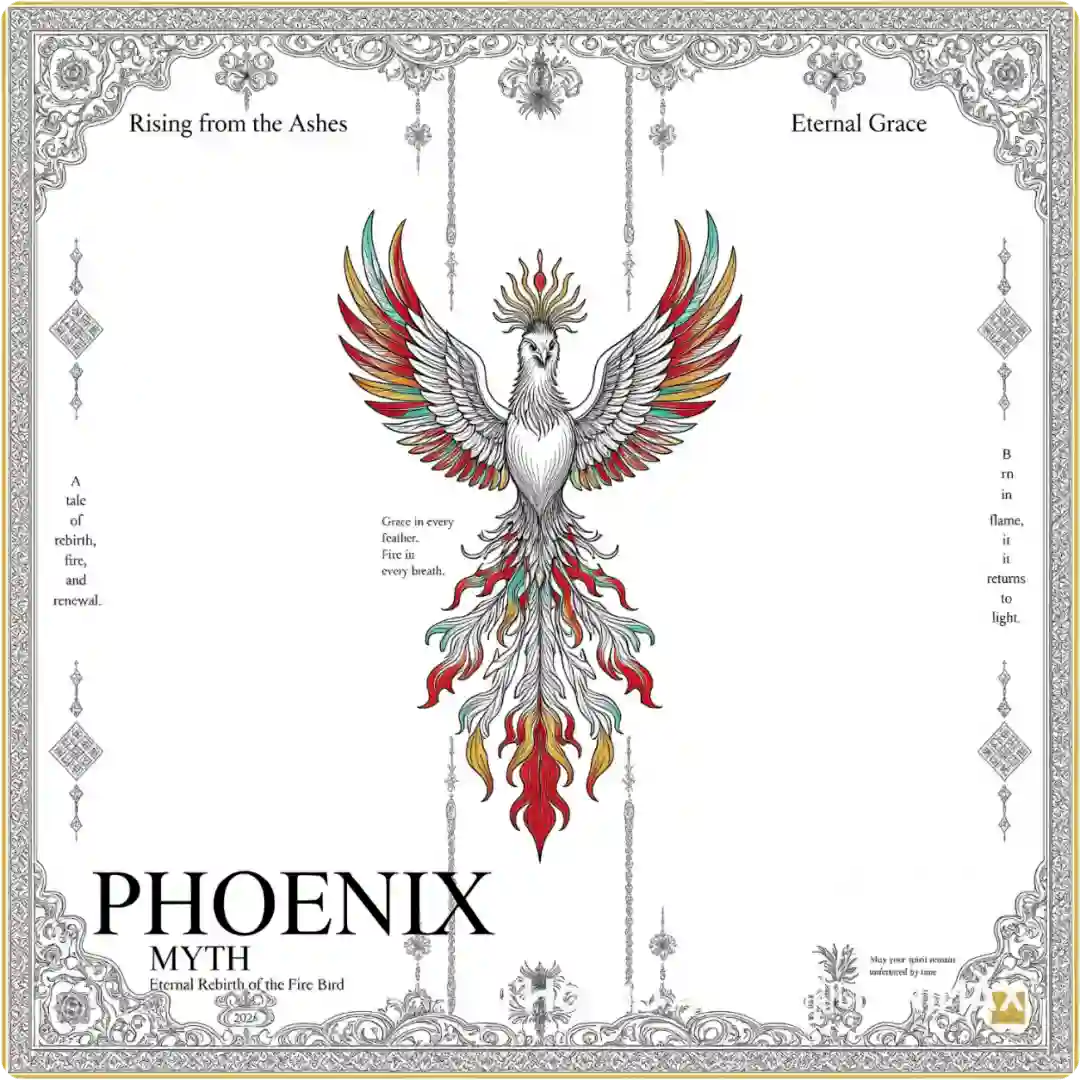
Our Phoenix poster combined an English headline, decorative illustration, supporting copy, and an ornate border.
The strongest result was the design hierarchy:
The main title anchors the page.
The illustration establishes the theme.
Smaller text and borders support the composition.
We found that typography and artwork could form a coherent poster. Small lettering still needed close inspection.
For your own brief:
Supply exact copy.
Set the reading order.
Reserve space around important text.
Proofread at the final display size.
Use a layout editor for precise small text and last-minute copy changes.
Exploded Views and Visual Explanation
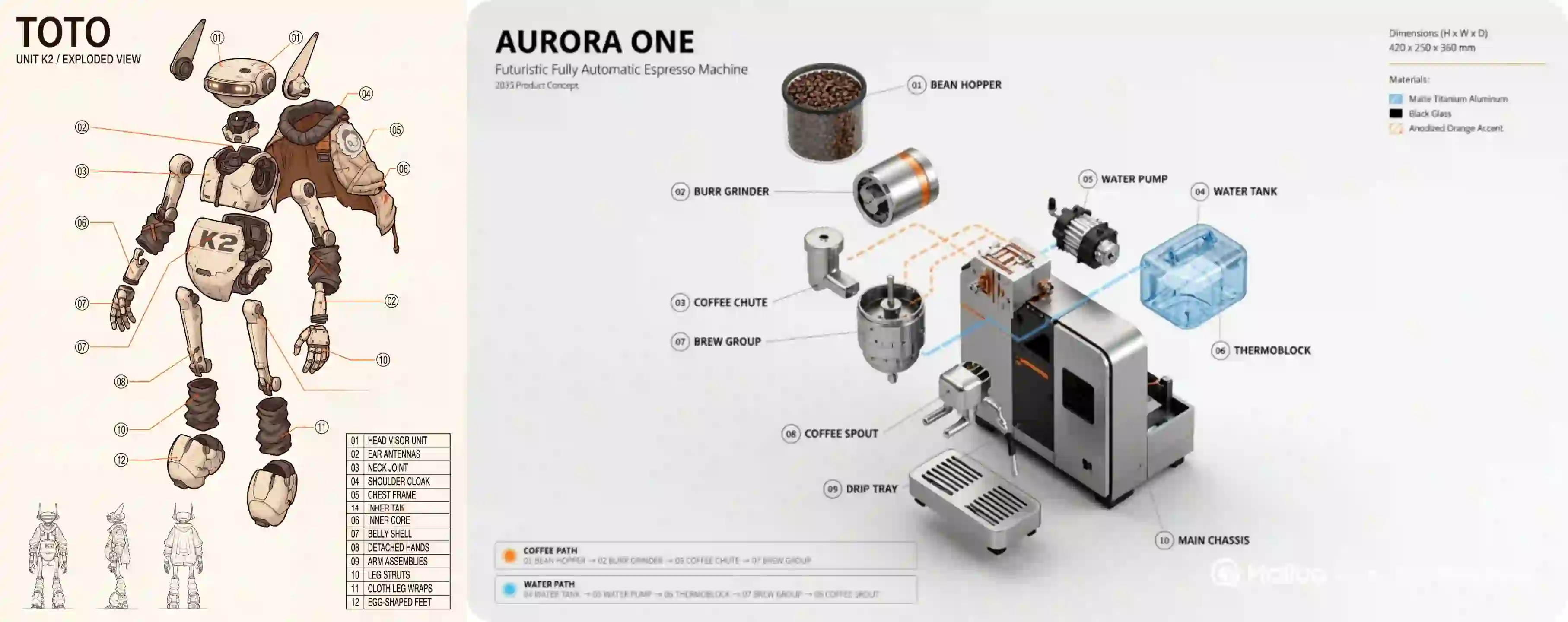
We tested a robot breakdown and a coffee-machine infographic to explore information design.
Robot breakdown: separates a complex character into recognizable components.
Coffee-machine infographic: combines parts, materials, labels, and flow information.
Our takeaway:
The model can organize a detailed brief into an accessible visual explanation.
The whole object, its parts, and its annotations need a clear hierarchy.
Before generating, list the essential components and relationships.
Before publishing, check:
Part names and numbering.
Connector endpoints.
Material labels and flow directions.
Architectural Structure and Spatial Relationships
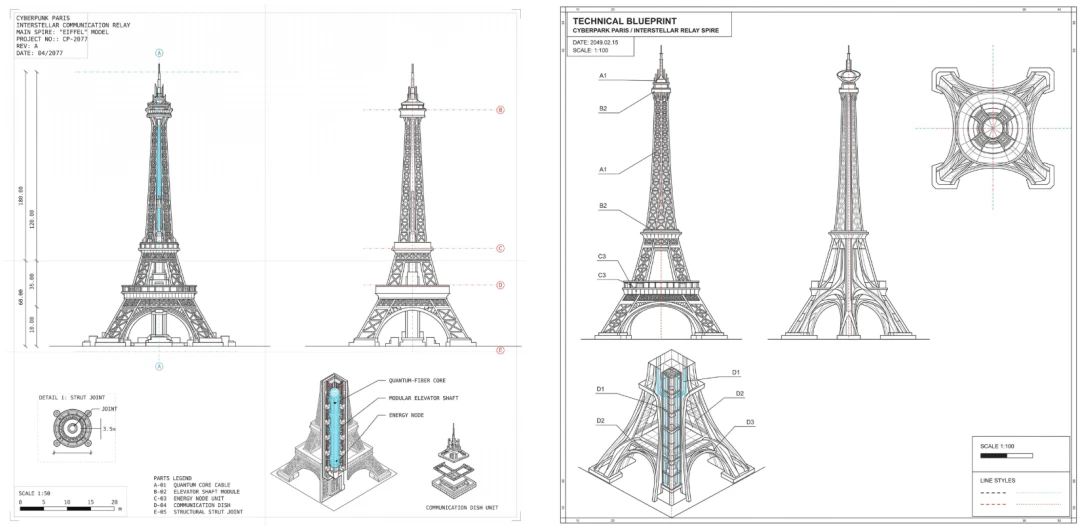
Our architectural graphic tested how a larger structure could be explained through its overall form and local details.
The useful result was a presentation that connected the whole with its parts.
Give each view a purpose:
Overall view: establish the building’s form.
Section: explain internal organization.
Detail view: clarify one structural relationship.
This approach suits architectural concepts, educational diagrams, and design presentations.
Verify dimensions and physical relationships before technical use.
Try MiniMax H3 Image Generator
Game Art and HUD Integration
Keep the world and its interface visually connected.
A Unified Visual Style
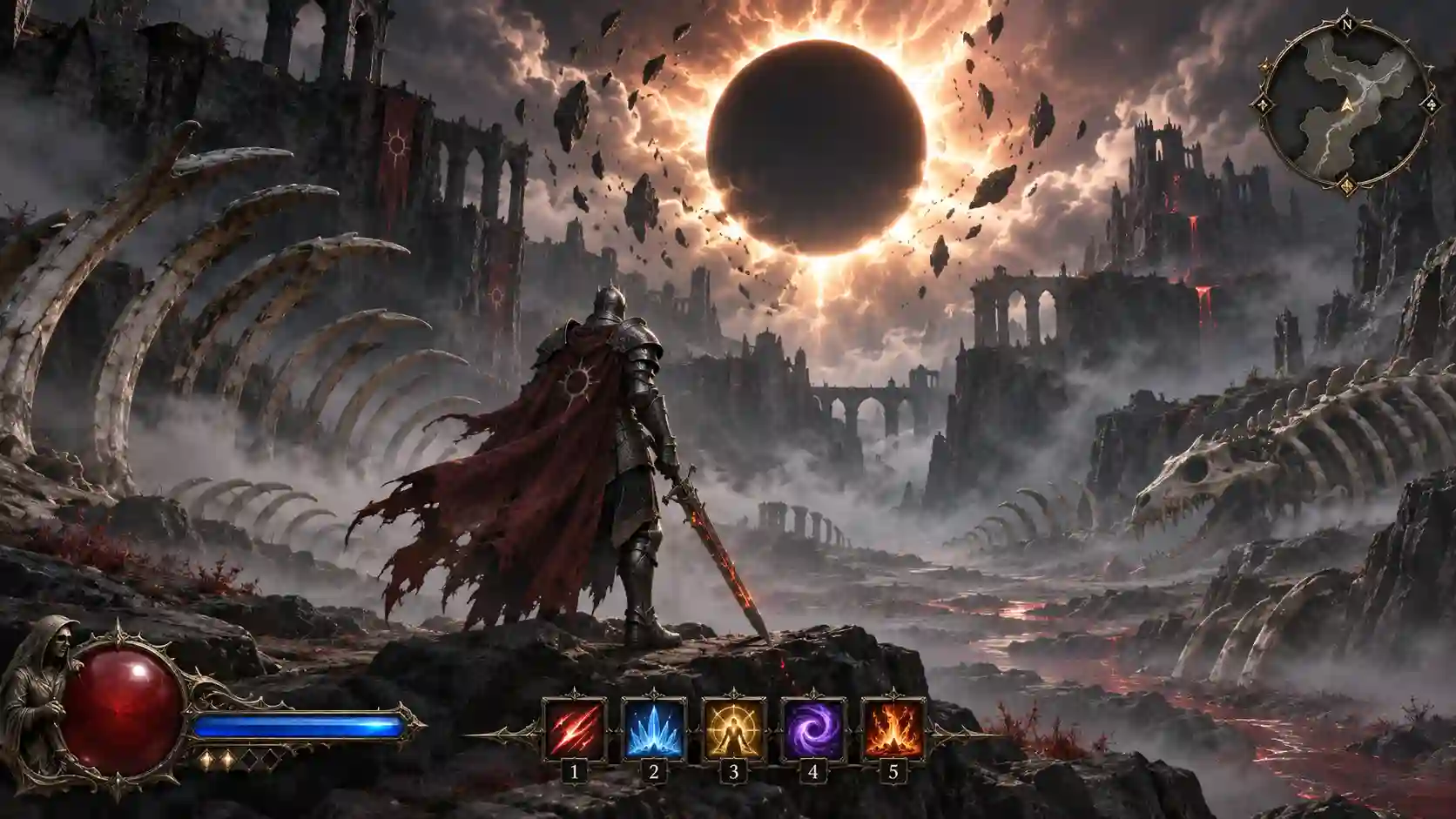
Our dark-fantasy image combined an armored figure, ruined terrain, a black sun, and a complete interface.
The scene held together through:
A cold palette and heavy atmosphere.
Worn materials across the world and character.
Decorative UI that matched the setting.
We found that the interface helped complete the art direction.
Characters, scenery, and HUD shared a visual vocabulary.
Set the palette and lighting first. Then describe how bars, icons, and map elements should fit the same world.
Integrating Gameplay Information
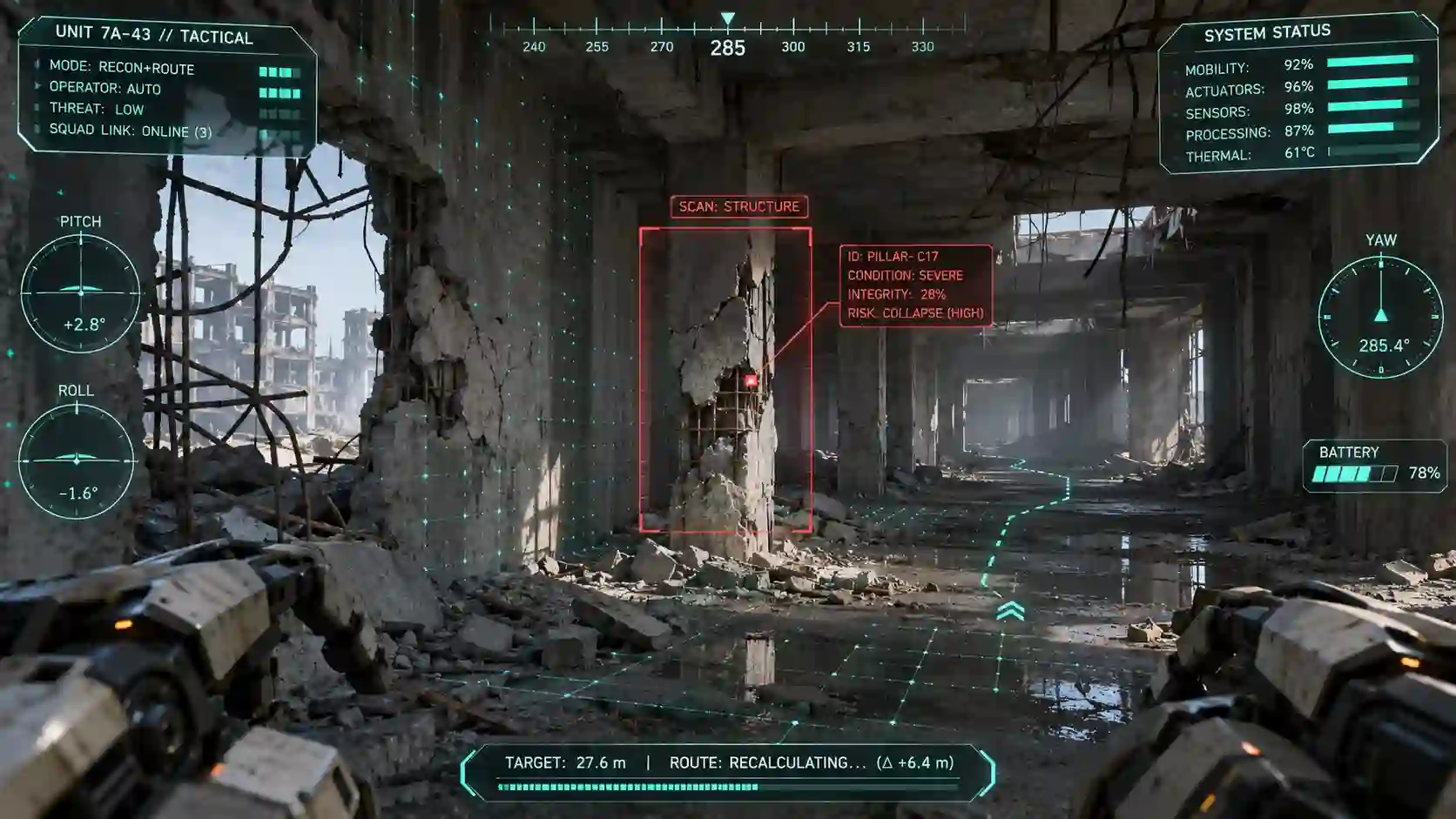
Our shooter-style test combined the scene’s viewpoint with a readable information layer.
The useful result was clear integration: gameplay information supported the view and retained its own hierarchy.
For game UI concepts:
Define scene elements and interface overlays separately.
Assign positions to essential information.
Keep scale and contrast consistent.
Leave the focal action visible.
Use these images to communicate a pitch or prototype.
Build interactive behavior and production UI in your design and development tools.
Multi-Reference Accuracy and Consistency
Bring several references together without losing their roles.
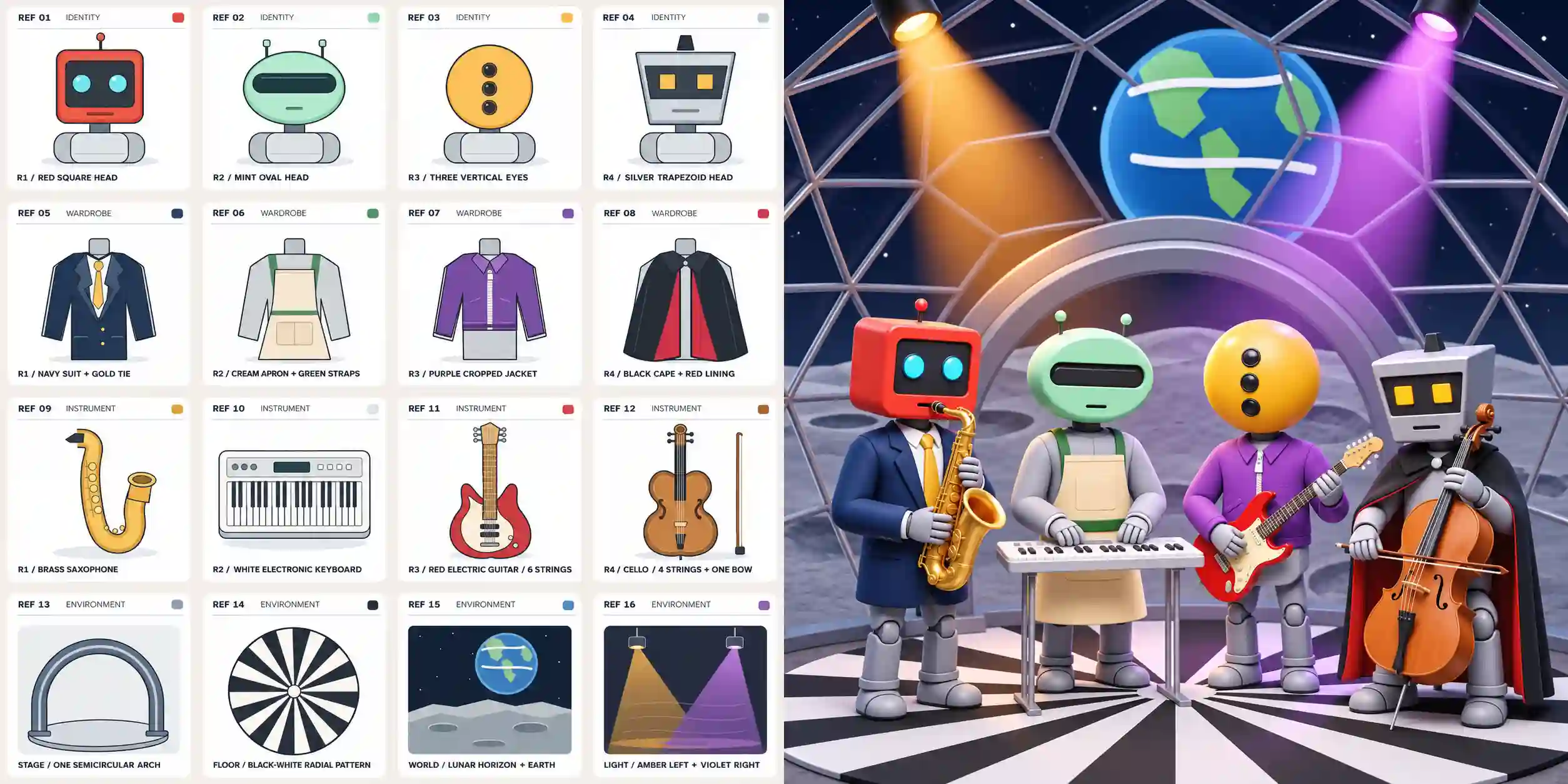
Our robot-band test used 16 references:
Four heads.
Four outfits.
Four instruments.
Four environment references.
We found that the main character–outfit–instrument assignments stayed aligned with the brief.
The stage, patterned floor, distant Earth, and contrasting lights also appeared in the composition.
The result demonstrated clear reference binding within a complex scene.
Apply the method:
1.Group inputs by identity, wardrobe, props, environment, and light.
2.State which elements belong together.
3.Compare defining features with the original references.
Save an approved set for recurring characters, branded scenes, and illustrated series.
Photorealistic Surrealism
Make the impossible feel photographed.
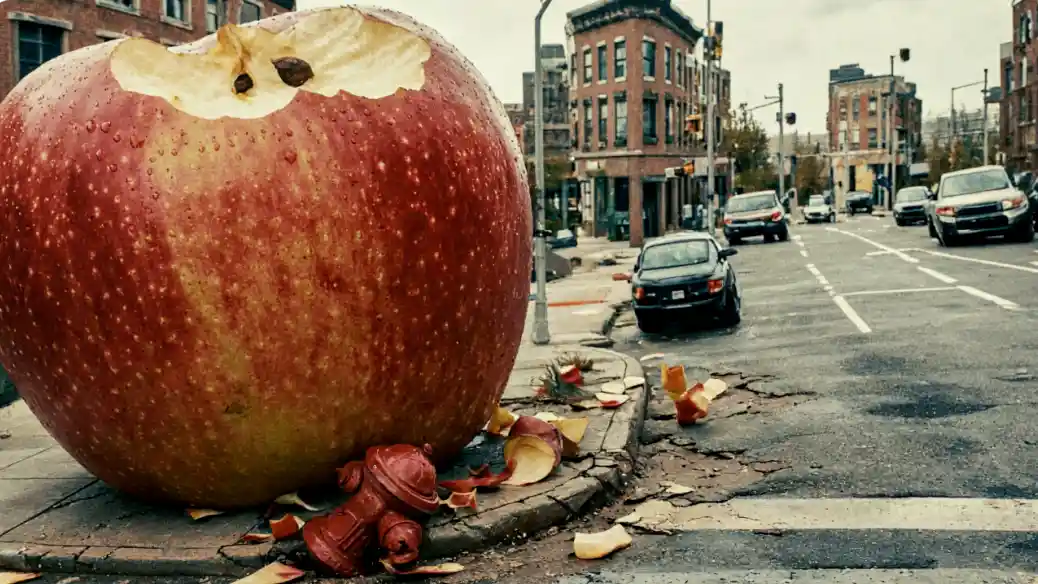
We tested a nonrealistic scene with a photographic treatment. Its unusual concept remained grounded through familiar visual cues.
The convincing effect depended on:
Consistent perspective and scale.
Shared lighting and believable shadows.
Material detail that connected the unusual element with its setting.
Creative tip:
Establish one clear departure from reality.
Make the surrounding camera, light, and environment support it.
Use this approach for concept advertising, visual metaphors, album covers, and cinematic key visuals.
Creative Ways to Use MiniMax H3 Image
Match the model’s strengths to your next project.
Brand Campaigns and Social Covers
Combine photographic detail and surreal ideas around one clear theme.
Develop coordinated covers, social images, and website heroes.
Posters and Event Graphics
Use typography and composition control to organize the message.
Adapt the artwork across formats, preserving room for practical details.
Product Explainers and Design Presentations
Apply information organization and structural imagery to parts and materials.
Build component diagrams, concept sheets, and presentation visuals.
Game Concepts and Pitch Decks
Combine stylized generation and HUD integration around a shared art direction.
Explore characters, environments, and interface concepts as one project.
Character-Led Visual Series
Use multi-reference control to pair characters with selected outfits and settings.
Compare each new result with the approved reference set.
Storyboards and Video Keyframes
Develop high-quality scene images and reference-guided compositions first.
Use suitable stills to establish subjects and visual direction for H3 video creation.
Where to Use MiniMax H3 Image
You can use MiniMax H3 Image online to create or edit images directly in your browser.
Choose Text to Image for a new visual or Image Edit for your own photos and references.
Start with a Gallery Prompt or Remix Example, and use Expand Prompt to develop your brief.
Adjust the image settings, check the credit estimate, then generate, preview, and download your result.
MiniMax H3 Image FAQs
When Was MiniMax H3 Image Released?
Model release date: November 10, 2026, as listed in the release record.
Can MiniMax H3 Image Generate Transparent Backgrounds?
The current model does not support transparent backgrounds. PNG output alone does not establish transparency. Use a separate background-removal workflow for cutouts.
Can It Export Editable 3D Models or CAD Files?
These workflows produce images. Use renders, exploded views, and architectural diagrams as concepts. Editable geometry and CAD files require the appropriate production tools.
Do I Need Coding Skills to Use It Online?
No. You can work with written prompts and reference images through the website. API integration and custom deployment are optional technical paths.
Can I Generate Images With Text Only?
Yes. Describe the subject, composition, lighting, and style. Add reference images when an existing person, product, or layout needs to guide the result.
Can I Use My Own Photos or Product Images?
Yes. H3 Image supports reference-based generation and editing. Use clear images and explain what each should contribute.
Do I Have to Run MiniMax H3 Image Locally?
No. You can generate images online on this site. The model runs on the hosted service, so you do not need to download its weights or provide your own GPU.
What Do I Need to Run It Locally?
You need model files, compatible software, and enough GPU memory, RAM, and storage. Generate images online here to skip local setup.