Quick verdict
Is MiniMax H3 Worth Using?
MiniMax H3 is most compelling when a short video needs more than a text prompt. Its image, video, and audio references offer useful creative control, while 2K output gives creators a higher-resolution delivery option.
It is not a one-click replacement for editing or production. Complex action, several characters, hands interacting with products, and tightly timed dialogue can still need more than one attempt.
Reference control
Strong fit
Use images, video, and audio to guide identity, movement, visual direction, and sound.
Output quality
Up to 2K
Choose 768P for lower credit use or 2K when the final clip needs more visible detail.
Audio
Built in
Generate dialogue, ambience, music, and effects together with the video.
Consistency
Scene-dependent
Simple, clearly directed shots are easier to keep stable than crowded scenes or difficult interactions.
Production fit
Short-form
Best suited to individual shots and short story beats rather than a complete long video in one generation.
Choose H3 when you need
- Short cinematic or advertising shots
- Character, product, motion, or style references
- Generated dialogue and scene sound
- First-to-last-frame control
- A 2K output option
Consider another workflow when you need
- More than 15 seconds from one generation
- The same result on every attempt
- A finished multi-scene edit from one prompt
- Complex action with no time for retries
This review uses the currently available workflows, official showcase videos, credit rates, and product limits. Showcase quality demonstrates what is possible, not how often the same result will occur.
See H3 in action
Official Video Examples
Each example highlights a different way to create with MiniMax H3. They show possible results, not a result that every prompt will reproduce.
Title sequence
Film opening cast sequence
This opening sequence moves between cast portraits, graphic layouts, and animated titles. It shows how H3 can combine character footage with a clear visual identity across a fast edit.
Creative effects
Hand-drawn visual effects
Illustrated marks and animated accents are layered over live-action footage. The treatment follows the scene instead of behaving like a separate static overlay.
Promotional edit
Trailer remix
This fast promotional cut combines short visual beats into a compact trailer. It demonstrates pacing, dramatic transitions, and a consistent tone across several shots.
Product advertising
Product performance ad
This advertising example places a featured person and product in the same polished sequence. It shows the type of short performance-led content H3 can create for a campaign concept.
Product storytelling
Product teardown reveal
This product reveal separates components and presents them as part of a visual explanation. The effects support the product story while keeping the main form easy to recognize.
Character story
Vertical live-action micro drama
This portrait-format scene focuses on character performance, conversation, and continuity between shots. It shows a direction suited to short narrative and mobile-first video.
What it is and what it supports
What Is MiniMax H3?
MiniMax H3 is a short-form AI video model for creating clips from text, frames, or mixed media references. It supports synchronized audio, output up to 2K, and three workflows for different levels of creative control.
MiniMax H3 Specs and Workflows
Reference audio cannot be used alone. Include at least one image or video when using audio as a reference.
Output length
4–15 seconds
Resolution
768P or 2K
Text to Video
Supported
Image to Video
Required first frame; optional last frame
Reference images
Up to 9
Reference videos
Up to 3; 15 seconds total
Reference audio
Up to 3; 15 seconds total
Combined references
Up to 12 materials
Text to Video
Start from a written scene, action, camera, and sound description.
Image to Video
Animate a required first frame and optionally guide the ending with a last frame.
Reference to Video
Combine images, video, and audio to guide identity, motion, camera behavior, or sound.
Official quality comparison
MiniMax H3 768P vs 2K Video Quality
These official MiniMax pairs show Text-to-Video, Image-to-Video, and Reference-to-Video results at 768P and 2K. Play both versions full screen to compare fine texture, edges, small text, and background detail.
Text to Video
Compare the same prompt-led scene at both available output levels.
Image to Video
Compare how the frame-led result carries texture, edges, and small visual details.
Reference to Video
Compare a reference-guided result while watching detail, motion, and visual consistency.
How the higher-resolution result is made
How MiniMax H3 Creates 2K Video
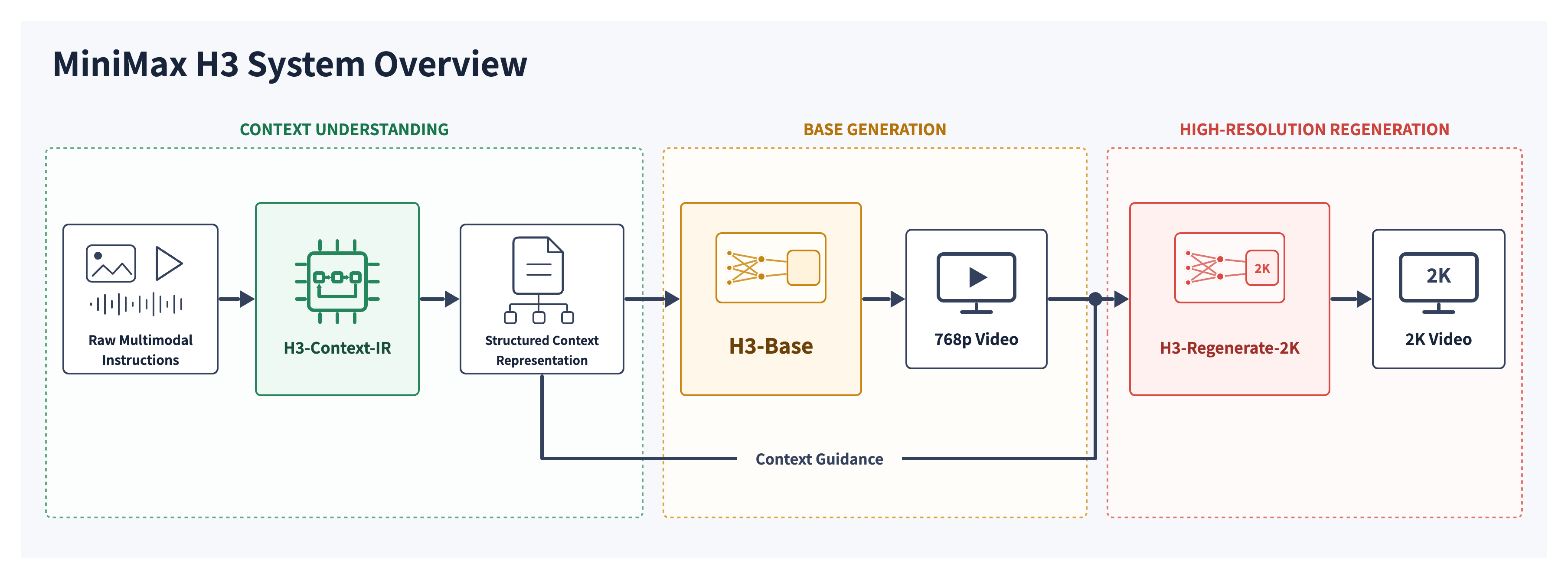
H3 first creates a 768P base result. H3-Regenerate-2K then uses that video together with the original context to produce the 2K version. MiniMax describes this as in-context regeneration, not conventional upscaling.
Quality, control, and real use
Video Quality, Motion, Audio, and Control
H3 is strongest when the brief benefits from visual or audio references. Its production value depends on more than a polished first frame, so the full clip should be judged for motion, consistency, sound, and instruction control.
Performance at a glance
Published output specifications paired with the current online generation experience.
4–15 sec
Output length
Built for individual shots and short story beats
24 FPS
Frame rate
The published output frame rate for H3 video
768P / 2K
Resolution
Test at 768P or choose 2K for final delivery
About 3 min
Typical wait
The estimate shown while an online generation is running
Processing time is an estimate, not a guarantee. It can vary with the selected workflow, resolution, demand, and reference files.
Video quality, motion, and physical action
What stands out
The official examples show detailed lighting, deliberate camera movement, stylized effects, and fast edits across several types of scene.
Where to be careful
The harder question is whether that quality holds through hands, props, impacts, people crossing, and rapid changes in camera direction. Those scenes leave more room for distorted objects or unnatural movement.
Character and product consistency
What stands out
Reference images give H3 a clearer target for a face, outfit, product, or visual style. This is useful when appearance matters more than generating a completely new subject.
Where to be careful
Consistency becomes harder across many shots, distant faces, partial occlusion, or conflicting reference files. Product shape and labels should be checked through the entire clip, not only in the first frame.
Audio, dialogue, and lip sync
What stands out
H3 can create dialogue, ambience, music, and sound effects with the video. Audio references can also help guide the sound in Reference-to-Video mode.
Where to be careful
A usable clip still depends on clear speech, the right speaker, believable lip movement, balanced volume, and sound that stays aligned after a cut. Multi-speaker scenes are a more demanding use case.
Multimodal reference control
What stands out
This is H3's clearest advantage. Images can guide identity or appearance, video can guide motion, and audio can guide sound within the same short generation.
Where to be careful
More files do not automatically create a better result. H3 has to resolve every instruction, so references work best when each one has a single, compatible purpose.
2K output and usable detail
What stands out
The available 2K option is useful for final delivery, reframing, and scenes where texture or small visual details matter. The 768P option costs fewer credits and is better suited to early testing.
Where to be careful
Higher resolution cannot repair weak motion, identity drift, or an incorrect composition. Choosing 2K makes the most sense after the creative direction is already working.
The cost of a usable clip matters more than one generation
The listed credit rate tells you the cost of one attempt. The practical cost also includes discarded results and retries. Test the difficult part of a shot at 768P first, keep the prompt and references fixed, and move to 2K after the direction is working.
Credit cost
How Much Does MiniMax H3 Cost?
A 768P video uses 9 credits per second. A 2K video uses 14 credits per second. For Reference-to-Video, credits are calculated from the combined duration of uploaded reference videos and the generated video.
| Resolution | Rate | 5-second credits | Approx. 5-sec cost | 15-second credits | Approx. 15-sec cost |
|---|---|---|---|---|---|
| 768P | 9 credits/sec | 45 credits | $0.81 | 135 credits | $2.43 |
| 2K | 14 credits/sec | 70 credits | $1.26 | 210 credits | $3.78 |
The dollar estimates use the $99.90 pack with 5,550 credits, equal to about $0.018 per credit. Smaller packs have a different cost per credit. Retries also increase the final cost of a usable clip.
View credit packs →Strengths, limits, and fit
Strengths and Limitations
H3 suits creators who need reference control or 2K output and can allow time for testing and retries.
Reasons to choose H3
- Output up to 2K
- Image, video, and audio references
- Required first frame and optional last frame
- Synchronized audio
- Several ways to guide subjects, motion, and sound
Limits to consider
- Maximum 15-second output
- Difficult action may require retries
- Faces may change in demanding scenes
- Unclear references can conflict
- The cheapest generation may not produce the cheapest usable result
Need faster generation?
MiniMax H3 Max focuses on speed and supports 480P or 768P output. Standard H3 is the better match when you need 2K or image, video, and audio references in one workflow.
Compare H3 and H3 MaxCommon questions
Frequently Asked Questions
Is MiniMax H3 good?+
MiniMax H3 can work well for short videos that need mixed media references, synchronized audio, frame control, or output up to 2K. Results depend on the prompt, source files, scene complexity, and number of attempts.
What is MiniMax H3 best for?+
It suits short product videos, ad concepts, cinematic scenes, character clips, first-to-last-frame transitions, and videos guided by images, video, or audio.
What are the pros and cons of MiniMax H3?+
Its main strengths are 2K output, synchronized audio, and flexible image, video, and audio references. Its main limits are the 15-second maximum and the need for retries in demanding scenes.
What are the main MiniMax H3 limitations?+
The maximum output is 15 seconds. Difficult motion, hands and props, objects crossing in front of people, several characters, conflicting references, and long shot lists may require retries.
Does MiniMax H3 generate 2K video?+
Yes. MiniMax H3 supports 768P and 2K output options.
How many credits does MiniMax H3 use?+
Generation uses 9 credits per second at 768P or 14 credits per second at 2K. For Reference-to-Video, the billable duration combines uploaded reference video time and output video time.
Is MiniMax H3 better than H3 Max?+
Neither model fits every task. H3 supports 2K and a wider reference workflow. H3 Max focuses on faster 480P and 768P generation.
Can MiniMax H3 use audio references?+
Yes, in Reference-to-Video mode. Audio cannot be the only reference; include at least one image or video.
Can I use MiniMax H3 for commercial projects?+
MiniMax H3 can create commercial concepts and video assets. Review every output, make sure you have rights to uploaded files, and check the terms that apply to your planned use.