Seedance 2.5 became one of the most talked-about AI video launches of 2026 almost immediately after its July 31 release. Creators were drawn to its 30-second generation, larger multimodal reference limits, multi-round extension, and more targeted editing controls.
MiniMax H3 was introduced on the same day with a different proposition. The model brings text, images, video, and audio into one multimodal workflow, while its openly released weights give developers more room to build private, customized, or integrated solutions.
Both AI models can produce high-quality AI video, but they are optimized for different production jobs.
MiniMax H3 and Seedance 2.5: Which Fits Your Workflow?
Pick the model based on the most difficult requirement in your video.
MiniMax H3 is the stronger first option for stylized art direction, clear visual hierarchy, polished transitions, surreal effects, product presentation, and high-volume short-form work.
Seedance 2.5 is better aligned with cinematic realism, credible character acting, emotional continuity, complex staging, and longer narrative sequences.
Production Need | Better First Choice | Why |
AI music videos | MiniMax H3 | Keeps visual effects centered on the artist and performance |
Creative and surreal ads | MiniMax H3 | Delivers stronger mixed-media unity and visual impact |
Product and DTC campaigns | MiniMax H3 | Highlights materials, construction, and brand details more clearly |
Fashion campaigns | MiniMax H3 | Creates more editorial, post-designed visual treatments |
Game concept videos | MiniMax H3 | Shows stronger world logic and art-direction consistency |
Performance marketing | MiniMax H3 | Fits short creative units and rapid variation testing |
Realistic character scenes | Seedance 2.5 | Produces more convincing expressions, movement, and physical acting |
Cinematic commercials | Seedance 2.5 | Supports stronger staging and human-centered storytelling |
AI short films | Seedance 2.5 | Uses longer scenes to develop narrative beats |
30-second story ads | Seedance 2.5 | Provides more room for setup, progression, and payoff |
Game cinematics | Test both | Use H3 for visual design and Seedance for cinematic presentation |
Multi-shot campaigns | Use both | Send design-heavy and performance-heavy shots to different models |
Main Differences Between MiniMax H3 and Seedance 2.5
MiniMax broadens the production toolkit; Seedance gives the story more room.
MiniMax H3 combines tasks that were once handled separately. Its workflow covers text-to-video, first- and last-frame animation, and reference-driven generation with image, video, and audio inputs. Current options include 4–15 second output at 768P or 2K, with up to nine images, three videos, three audio files, and 12 mixed references in one task.
Seedance 2.5 is designed around larger, more controllable scenes. It can produce up to 30 seconds in one generation, use as many as 30 images, 10 videos, and 10 audio clips, and support extensions, timestamp control, camera changes, green-screen workflows, and targeted edits to characters, actions, sound, or plot.
Feature | MiniMax H3 | Seedance 2.5 |
Core direction | Unified multimodal video production | Longer, directed scene creation |
Native duration | 4–15 seconds | Up to 30 seconds |
Output options | 768P and 2K | Depends on the available platform workflow |
Image references | Up to 9 | Up to 30 |
Video references | Up to 3 | Up to 10 |
Audio references | Up to 3 | Up to 10 |
Reference strategy | Give different roles to mixed inputs | Coordinate a larger asset set across one scene |
Editing approach | Natural-language reference and editing | Timestamp, camera, green-screen, and reference editing |
Primary production value | Designed short-form output | Sustained story and character performance |
That difference shapes the final look.
H3 often treats a clip as a complete visual-design assignment.
Seedance approaches it more like a directed scene built around time, movement, acting, and continuity.
Which Model Produces Stronger AI Product Ads?
A polished ad shows the product accurately.
The first matched test asked both models to promote a vintage, elegant pair of cream-colored over-ear headphones.
MiniMax H3 Result
The H3 version kept the object at the center of the commercial:
The cream color remained visually dominant.
Materials and structural features were easier to identify.
Brand elements were incorporated more effectively.
The composition emphasized the features that differentiated the headphones.
Seedance 2.5 Result
The Seedance output delivered a refined lifestyle-ad atmosphere. Its lighting, framing, and premium mood made the headphones look marketable, but several defining details were not fully protected:
The leather finish was not emphasized clearly.
The gold multidirectional control detail was less visible.
The logo and brand text contained inaccuracies.
The surrounding atmosphere occasionally competed with the product itself.
Test verdict:
In this example, H3 created the more product-focused commercial, while Seedance 2.5 produced the more atmospheric lifestyle ad.
Which Model Creates a More Convincing Game World?
A game world needs internal logic, not only spectacle.
The game concept test examined architecture, spatial relationships, equipment, environmental rules, and art-direction consistency.
MiniMax H3 Result
The H3 version paid closer attention to
scene layout
architectural relationships
equipment design
coherent game-art language
Instead of only presenting an impressive fantasy image, it suggested a world with clearer design rules.
Seedance 2.5 Result
The Seedance clip emphasized
cinematic scale
dramatic lighting
atmospheric scenery
trailer-like presentation
It made the environment feel expansive and ready to be filmed.
Test verdict:
H3 produced the more coherent game concept, while Seedance 2.5 delivered the more cinematic interpretation.
Which Model Makes Better AI Music Videos?
Every visual choice should support the artist and the song.
An effective AI music video needs more than a dramatic background. The performer, rhythm, visual effects, and emotional tone must feel intentionally connected.
MiniMax H3 Result
The H3 output established a stronger hierarchy:
the singer stayed at the center,
the stylized background reinforced the performance,
exaggerated elements supported the identity of the track rather than distracting from it.
The sequence felt art-directed around one concept.
Seedance 2.5 Result
The Seedance version also delivered rich, stylized imagery, but the composition was less disciplined. Several elements competed for attention, the focal point shifted, and some background effects had little relationship to the performance.
Test verdict:
H3 created the more focused and attention-grabbing MV, while Seedance 2.5 offered more visual information without making every element serve the singer.
Which Model Handles Creative Transitions More Naturally?
Mixed styles work only when they feel like parts of the same idea.
The creative test combined animation, realistic environments, stylized transitions, and deliberately non-realistic elements.
MiniMax H3 Result
The output showed stronger post-production unity.
Camera transitions were smoother,
Animation remained fluid,
Fantasy elements entered the realistic environment with clearer visual logic.
The ending also preserved the style established earlier in the sequence.
Seedance 2.5 Result
The Seedance result contained more obvious breaks. Some cuts felt abrupt, animation and reality did not always interact convincingly, and the ending moved too far from the initial art direction.
The overall sequence therefore retained a more visible AI-generated quality.
Test verdict:
H3 produced the more integrated mixed-media video, with animation, live-action elements, and transitions operating as one visual system.
How Well Does MiniMax H3 Read a Sequence of Keyframes?
The value is not just motion, it is understanding the intended sequence.
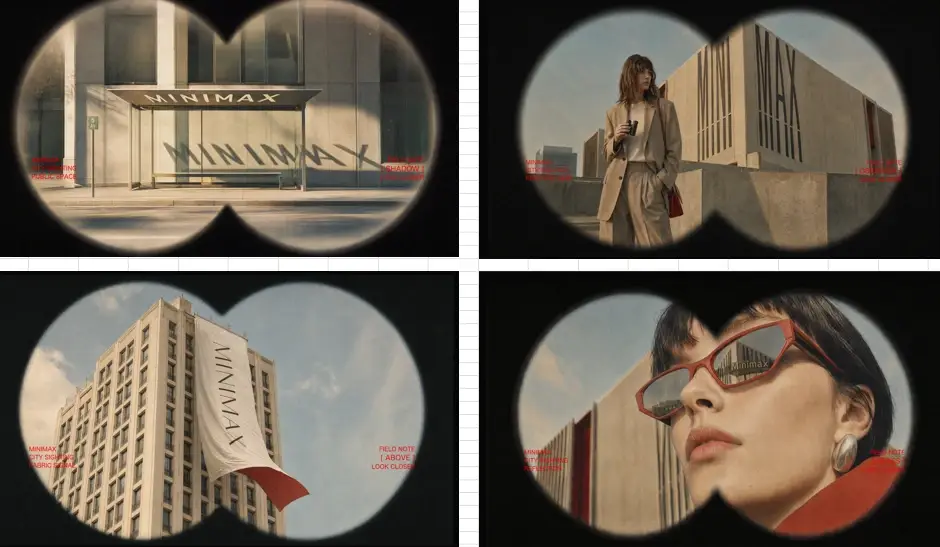
In the independent keyframe example, four fashion images became a 15-second brand trailer.
The model used composition, subject placement, and the implied order of the references to create
rapid focus shifts
whip-pan transitions
optical trails
natural fabric movement
gradual brand-text reveals
a consistent 35mm look
a unified campaign structure
The example shows that H3 did more than animate four stills. It treated the images as connected parts of one visual concept and used each frame to guide pacing, camera language, and brand presentation.
This makes the workflow useful for
fashion campaigns
product teasers
animated lookbooks
brand trailers
social media ads
How Should Creators Choose Between MiniMax H3 and Seedance 2.5?
MiniMax shapes the visual system; Seedance sustains the scene.
Creative Focus | MiniMax H3 | Seedance 2.5 |
Main strength | Designed short-form visuals | Longer cinematic scenes |
Best qualities | Stylization, transitions, mixed media, visual focus | Performance, movement, staging, continuity |
Best use cases | Music videos, product ads, fashion, creative campaigns | Short films, narrative ads, dialogue, character scenes |
Workflow advantage | Unified multimodal tasks and open weights | 30-second generation and larger reference sets |
Ideal user | Brands, agencies, musicians, developers | Filmmakers, advertisers, narrative creators |
MiniMax H3 is better positioned for work that depends on
visual hierarchy
smooth transitions
surreal effects
a finished post-production aesthetic
Open weights also give developers and production teams more freedom to test private, customized, or integrated workflows, although local use still requires serious storage, GPU capacity, and technical expertise.
Seedance 2.5 is better positioned for
cinematic realism
believable acting
emotional development
longer continuity
Its 30-second duration and larger reference limits allow one generation to carry a more complete narrative assignment.
Choose MiniMax H3 when the video needs stronger design.
Try MiniMax H3 Video Generator 👉
Choose Seedance 2.5 when the scene needs longer generation time.
Try Seedance 2.5 Video Generator 👉
MiniMax H3 vs Seedance 2.5: Cost Comparison
Measure the price of usable footage.
MiniMax lists H3 API output at $0.08 per second for 768P and $0.13 per second for 2K.
Seedance 2.5 does not currently have one universal global per-second price, so the final cost depends on the platform, plan, region, and credit system.
🔊 Pricing note:
API list prices can differ from subscriptions, promotional credits, regional packages, and third-party services. Confirm the current platform price before setting a production budget.
Production Task | H3 Reference Cost | Seedance 2.5 Cost Consideration | Better Starting Point |
10-second 768P concept test | 0.8 | Platform-based pricing | H3 for quick iteration |
15-second 2K commercial clip | 1.95 | Compare credit use and usable-output rate | H3 for short designed content |
About 30 seconds at 768P | $2.40 for two 15-second clips | One native 30-second task | Depends on editing and continuity |
30-second narrative scene | Requires multiple clips | One longer task with higher failure risk | Seedance for continuous storytelling |
Large set of ad variations | Cost rises with each short output | Long-form generation may be unnecessary | H3 for volume production |
Premium cinematic scene | Short clips may require stitching | One successful scene can reduce editing | Seedance for performance-heavy shots |
MiniMax H3 can be more economical for
short ads
fast testing
MV inserts
social content
replaceable creative shots
Seedance can lower total project cost when one successful 30-second result replaces several shorter clips and reduces continuity work.
Different models solve different creative problems.
MiniMax H3 is the stronger option for visual design, stylized short-form content, smooth transitions, and product-focused compositions.
Seedance 2.5 is the stronger option for realistic performance, cinematic staging, and longer narrative continuity.
Start with a practical duration and resolution, generate several versions, and compare which workflow reaches a publishable result with less correction.
Do not stop after finding one favorite system.
Test different AI video models for different shots, learn where each performs best, and build a workflow that combines their strengths.
MiniMax H3 vs Seedance 2.5 FAQs
Can You Use the Same Prompt With Both Models?
Use the same creative brief for a fair comparison, but adapt the final prompt to each workflow.
A design-focused short clip benefits from clear subject hierarchy and style direction, while a longer narrative scene needs timing, action order, camera planning, and continuity instructions.
How Many Outputs Should You Test Before Choosing?
Create at least three versions for any important task. One unusually strong or weak output can distort the comparison.
Multiple attempts reveal consistency, common failure patterns, and the real cost of reaching usable footage.
Is It Better to Start at a Lower Resolution?
Yes. Lower-resolution drafts are useful for checking framing, motion, camera behavior, and instruction following before spending more resources on the final high-resolution version.
What Should a Team Record During Model Testing?
Save the prompt, references, duration, aspect ratio, resolution, platform, generation date, output, and failure notes.
A consistent test log turns isolated experiments into a repeatable production workflow.
Can MiniMax H3 Run Locally?
Yes. Its openly available weights support local and customized deployment, but the setup requires significant storage, GPU resources, and technical knowledge.
For most creators, using MiniMaxH3.com in the cloud is faster and easier because it avoids installation and hardware configuration.